

HOW TO USE “ MSCONFIG “: 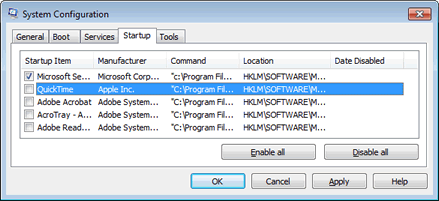 Built into the Windows operating system is a special tool called the “Microsoft system Configuration Utility” or simply “MSCONFIG.” Designed to help troubleshoot problems with a computer! MSCONFIG can be used to ensure that a computer boots faster and crashes less. Most people know that the more programs you have running on a computer simultaneously , the more likely that the PC will either run slowly or even crash. What most people don’t know is that every time you boot your computer a whole mess of “hidden” programs load in the background. Some of these hidden programs are essential, but most aren’t. Turning off some of these hidden programs can significantly increase your computer’s performance and reliability.
AUTOMATICALLY KILL PROGRAMS AT SHUTDOWN : Don’t you hate it when, while trying to shut down, you get message boxes telling you that a program is still running? To make it so Windows automatically kills applications that are running a snap. Simply navigate to the HKEY_CURRENT_USER Control Panel Desktop directory in the Registry, then alter the key AutoEndTasks to the value 1.
CHANGING THE DESKTOP ICON SIZE: 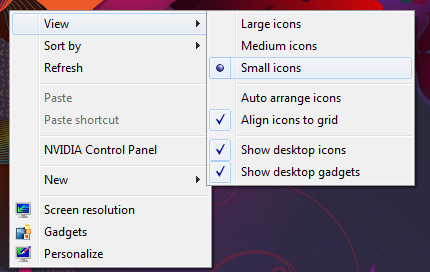 Windows now supports browser-style resizing control of text and icons on the Desktop! Just hold down the CTRL key and scroll the mouse wheel.
1. By default, the icons on the desktop are a little large
2. Right click on an open area of the desktop
3. Select View
4. Select Small Icons
 By default, Windows waits 30 seconds before it starts to load the OS
 1. To decrease this time, Right click on My Computer
2. Click on Advance System Settings
3. Under Startup and Recovery, click on the Settings button
4. Decrease the time from 30 seconds to something like 3